When Hackers Met Their Match: A Real-Time WordPress Attack, Dissected — We Watch Your Website
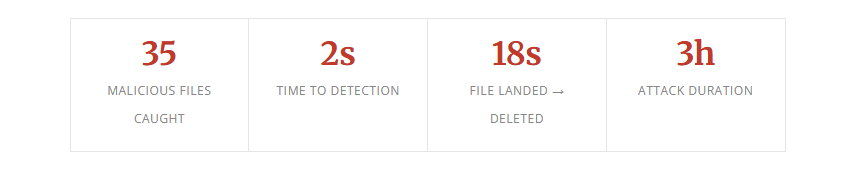
At 11:13 AM on March 4, 2026, an attacker who had compromised an administrative account on a WordPress-powered supplement retailer uploaded a malicious plugin zip file. Within seconds, our detection pipeline flagged it. What followed was a three-hour cat-and-mouse battle in which the attacker kept installing new malware while our system kept deleting it — automatically, in real time, often within seconds of each file hitting disk.
This is the story of that attack, how it unfolded, and what it reveals about a new class of aggressive, adaptive intrusion campaigns targeting WordPress sites.
How It Started: Stolen Credentials, Not a Vulnerability
A common misconception in WordPress security is that compromised sites are always the result of outdated plugins or unpatched vulnerabilities. This attack tells a different story.
The attacker had obtained valid administrator credentials — most likely through a credential stuffing attack using stolen passwords from a prior data breach. Our own research consistently shows that 81% of WordPress compromises occur through stolen credentials, not software exploits. This case was no exception.
With admin access in hand, the attacker didn’t need to find a vulnerability. They simply logged in and started installing plugins. Six of them, with names carefully chosen to look unremarkable:
- seo-1772622826 looks like an SEO plugin
- social-1772623330 social media integration
- slider-1772623549 image slider
- backup-1772624790 backup plugin — particularly clever
- contact_1772625254 contact form
- security_1772631413 a “security” plugin installing malware
The numeric suffixes are Unix timestamps — the exact second each was installed. The names are deliberate social engineering, designed to look like things an admin would expect to see and not question. A “security” plugin installing malware is a particular kind of irony. These are also something glaringly obvious to anyone who’s removed website malware. Maybe think, here they are! Remove these and we’re done.
The Attack Chain
Each plugin contained variants of the same multi-stage payload — a sophisticated attack chain we were able to reconstruct in full from our detection logs and forensic analysis. And each one using the site’s domain in the code. That itself would render checksums or hashes totally useless as it would be different for each site with this infection.
Stage 1: The Dropper
The initial payload was an XOR-obfuscated webshell triggered via HTTP POST. The POST parameter name was hex-encoded (\x70\x74r = ptr) to evade string matching, and the payload itself was hex-encoded then XOR’d against a numeric key. Rather than using eval() — which triggers most security scanners — the dropper wrote the decoded payload to a temp file, include‘d it to execute it, then immediately deleted the evidence with @unlink(). A campaign marker — <!--Mcb7BBK3--> — was embedded in an HTML comment, identifying this as part of a coordinated, automated campaign.
Stage 2: Reconnaissance
With code execution established, the attacker deployed a PHP-based filesystem scanner. It recursively walked the site’s document root, identified every .php file with write permissions, and returned a structured list back to the attacker’s tooling. This gave them a complete map of every file they could inject into.
Stage 3: Mass Injection
Armed with that file list, the toolkit injected a second-generation webshell into the first line of dozens of legitimate plugin files — prepended before the existing PHP, invisible unless you examined the very first line of each file. Files targeted ranged across Jetpack, WooCommerce, fluent-smtp, redis-cache, Beaver Builder, wp-seopress, and others. Each variant used slightly different encoding, but all followed the same execution pattern: decode → find writable temp directory → write hidden dotfile → include → unlink.
Stage 4: Persistence via /dev/shm
This is where the attack became particularly sophisticated. The attacker established a persistent command-and-control channel using Linux’s shared memory filesystem at /dev/shm. Two hidden dotfiles appeared there repeatedly:
.data— a watchdog that checked whether a process calledclass.prefswas running, and reported back to the attacker if not.dat— a downloader that fetched a ~1.8MB binary from C2 server178.20.210.177, saved it asclass.prefs, and executed it
/dev/shm is a tmpfs partition — it lives entirely in RAM, survives until reboot, and doesn’t get scanned by most file integrity monitors which focus on the webroot. The files were written, executed via include, then deleted — leaving no persistent file on disk. They reappeared on every HTTP request because the injected PHP was still active in the codebase. Using shared memory as a staging area is a deliberate evasion technique.
The C2 binary never successfully downloaded. The attacker’s server was blocked at the network level before the transfer completed.
Our System Was Already Fighting Back
Here’s what makes this incident particularly notable from a defensive standpoint. While all of this was happening, our detection and remediation pipeline was running autonomously in the background — automatically, without human intervention.
| File | Detected | Deleted | Total |
|---|---|---|---|
| seo-1772622826.zip | 11:13:55 | 11:14:08 | 13s |
| author-template-1772622907.zip | 11:15:21 | 11:15:28 | 7s |
| custom-file-2-1772623018.php | 11:17:02 | 11:17:06 | 4s |
| social-1772623330.zip | 11:22:17 | 11:22:27 | 10s |
| slider-1772623549.zip | 11:25:55 | 11:26:03 | 8s |
But the most striking example came during the final mass injection wave at 14:59. Here is the complete, unedited record for a single file, pulled directly from our detection database:
wp-seopress/vendor/phpseclib/phpseclib/phpseclib/Common/Functions/readme.inc.php
Stage: llm · Rule: llm_detection · Type: backdoor
Status: remediated · Delete successful
The attacker had an 18-second window during which that file existed on the server.
In total, our system detected and remediated 35 malicious files across the attack window. The LLM-based detection stage identified encoded payloads even when obfuscation defeated static pattern matching. A YARA rule flagged data.php — a 43KB obfuscated dropper we had seen on other sites, with a hash_seen_count of 8. Cross-site intelligence fired immediately.
The attacker kept trying. At 13:37, over two hours into the attack, they attempted another round of security_ plugins. At 14:33 they dropped data.php directly into the webroot. At 14:58 they initiated a final mass injection burst — 10 files across 8 plugins in under 60 seconds. Every wave was caught and cleaned.
What they found was that the ground was being swept out from under them as fast as they could plant anything.
Indicators of Compromise
For security professionals and hosting operations teams, the following indicators may be present on affected sites:
Network
- 178.20.210.177 — C2 server (block inbound and outbound)
- Download path: /782870b3147a4df656002e916553acea
Webshell POST Parameters
- ptr (\x70\x74r hex-encoded)
- comp
- ent (en\x74 hex-encoded)
Temp File Names (/dev/shm, /tmp, /var/tmp)
- .descriptor
- .dat
- .data
- .elem
Other Indicators
- Campaign HTML comment: <!–Mcb7BBK3–>
- Process name: class.prefs
- Plugin naming pattern: [category]-[unix_timestamp]
- XOR encoding keys: 51, 76, 77
- Alphabet string in XOR key derivation: abcdefghijklmnopqrstuvwxyz0123456789
- YARA rule: obfus_file_write_combo
What This Attack Reveals
Credentials are the primary threat vector. Not unpatched plugins. Not zero-days. Stolen passwords. Two-factor authentication on WordPress admin accounts is not optional anymore. This attack required zero technical exploitation of WordPress itself.
Backup directories are attack surface. Any directory under wp-content is web-accessible by default. Temporary backup directories left behind by plugins — even legitimate ones — can be exploited as hiding spots for persistent backdoors. They should either be outside the webroot or explicitly blocked at the web server level.
Attackers map your detection logic. The choice of the “upgrade” path wasn’t random. Whether through prior research or trial and error, the attacker found the one blind spot in the pipeline. Assume your detection rules will be probed and adapt accordingly.
Speed is the margin between incident and catastrophe. Thirteen seconds between detection and deletion. Eighteen seconds from file landing to file gone. That margin kept the class.prefs binary from executing and establishing a deeper foothold. A scan that runs once a day would have found the same files hours too late.
The Bottom Line
This site was actively under attack for over three hours. The attacker had valid admin credentials, a sophisticated multi-stage toolkit, a live command-and-control server, and a persistent webshell that survived initial cleanup. They adapted when their files were deleted, rotated their payloads, and probed for blind spots.
They did not succeed.
Thirty-five malicious files were automatically detected and deleted. The C2 binary never ran. The site was restored to full operation. The blind spot in our skip logic has been patched across all servers. And every hash, every IP, and every payload pattern from this attack now feeds into detection for every other site we protect.
This is what real-time WordPress security looks like — not a scan that runs once a day and emails you a report, but a system that watches every file as it lands and acts before the damage is done.